Technical resource
How to install SUPEE-10415
Historical Magento 1 shell workflow for checking, applying and verifying the SUPEE-10415 security patch.
Note: This is a historical Magento 1 patch procedure, retained as a technical reference. For a production store, assess migration to a current OpenMage release and verify every command, dependency and patch source before use.
SUPEE-10415 was released for Magento 1 in November 2017. This page preserves the original shell-based installation sequence in a cleaner format. It is not a substitute for checking the complete patch history of a long-lived store.
Before changing files
- Take recoverable file and database backups.
- Reproduce the change in staging first.
- Confirm that the patch file exactly matches the installed Magento edition and release.
- Record core customizations that may conflict with the patch.
- Put the store into an appropriate maintenance state.
- Disable Magento compilation if it is enabled.
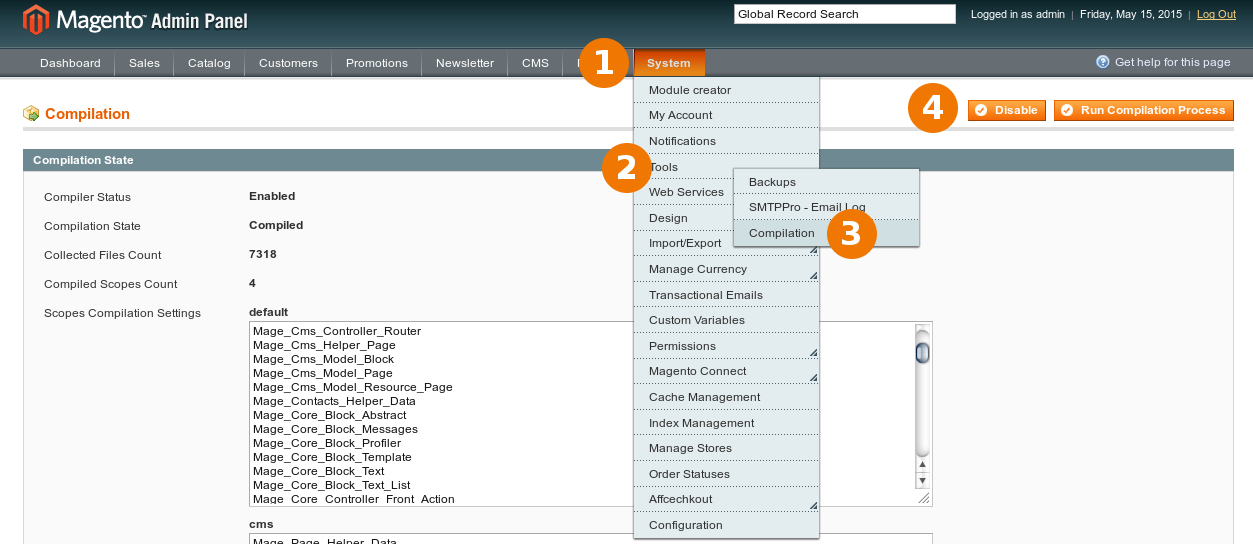
If the admin is unavailable, the historical compiler utility can report and clear the compiled state from the Magento root:
$ php -f shell/compiler.php -- state
Compiler Status:          Enabled
Compilation State:        Compiled
$ php -f shell/compiler.php -- disable
Compiler include path disabled
$ php -f shell/compiler.php -- clear
Compilation successfully cleared
1. Verify the Magento version
Run the check from the Magento root and compare the returned values with the patch filename and its release documentation.
$ grep -A6 'static function getVersionInfo' app/Mage.php
public static function getVersionInfo()
{
    return array(
        'major'    => '1',
        'minor'    => '9',
        'revision' => '2',
        'patch'    => '4',
The example reports Magento 1.9.2.4. Do not infer compatibility with another release from this example.
2. Obtain and place the matching patch
Use a trusted, verified archive for the exact Magento release. Place the patch
file directly in the Magento root, alongside app, shell, skin and
index.php.
$ ls -1 .
PATCH_SUPEE-10415_CE_1.9.2.4_v1-2017-11-27-06-51-32.sh
app
index.php
shell
skin
var
3. Apply the patch
Review the script and its permissions before execution. The historical command for this example was:
$ bash ./PATCH_SUPEE-10415_CE_1.9.2.4_v1-2017-11-27-06-51-32.sh
Checking if patch can be applied/reverted successfully...
Patch was applied/reverted successfully.
A success message confirms that the script completed; it does not by itself prove that the application is healthy or that the full security baseline is current.
4. Verify the store
Review the changed files, flush Magento and PHP opcode caches, and test the storefront, admin, checkout, payment callbacks and scheduled jobs. Keep the rollback available until those checks are complete. See the historical known patch and upgrade issues for compatibility notes associated with SUPEE-10415.
Comments
Archived discussion
Hello,
Yes, I have some difficulties. It´s not the first time, I have to install a patch. But it´s the first time with a problem.
bash ./PATCH_SUPEE-10415_CE_1.9.3…. Checking if patch can be applied/reverted successfully… /usr/bin/patch: **** Can’t create temporary file app/Mage.php.oKPIwdp : Permission denied ERROR: Patch can’t be applied/reverted successfully.
Do you have any idea?
thanks
Uli