OpenMage hosting
Which Hosting Suits OpenMage Best?
Choosing OpenMage hosting is not about finding a special OpenMage server. Learn how to size hosting by traffic, extensions and workload, with practical AWS, OVHcloud and Rackspace options.
If you are looking for OpenMage hosting, the first question is usually: How much CPU and RAM does OpenMage need?
That is not quite the right question.
There is no single server configuration that is “best for OpenMage”. A small OpenMage store serving a few simultaneous visitors and a busy store processing hundreds of concurrent sessions are technically running the same ecommerce platform — but their infrastructure requirements can differ by an order of magnitude.
The right hosting should therefore be selected for the expected workload of your particular store, not simply because a hosting plan has “Magento” or “OpenMage” in its name.
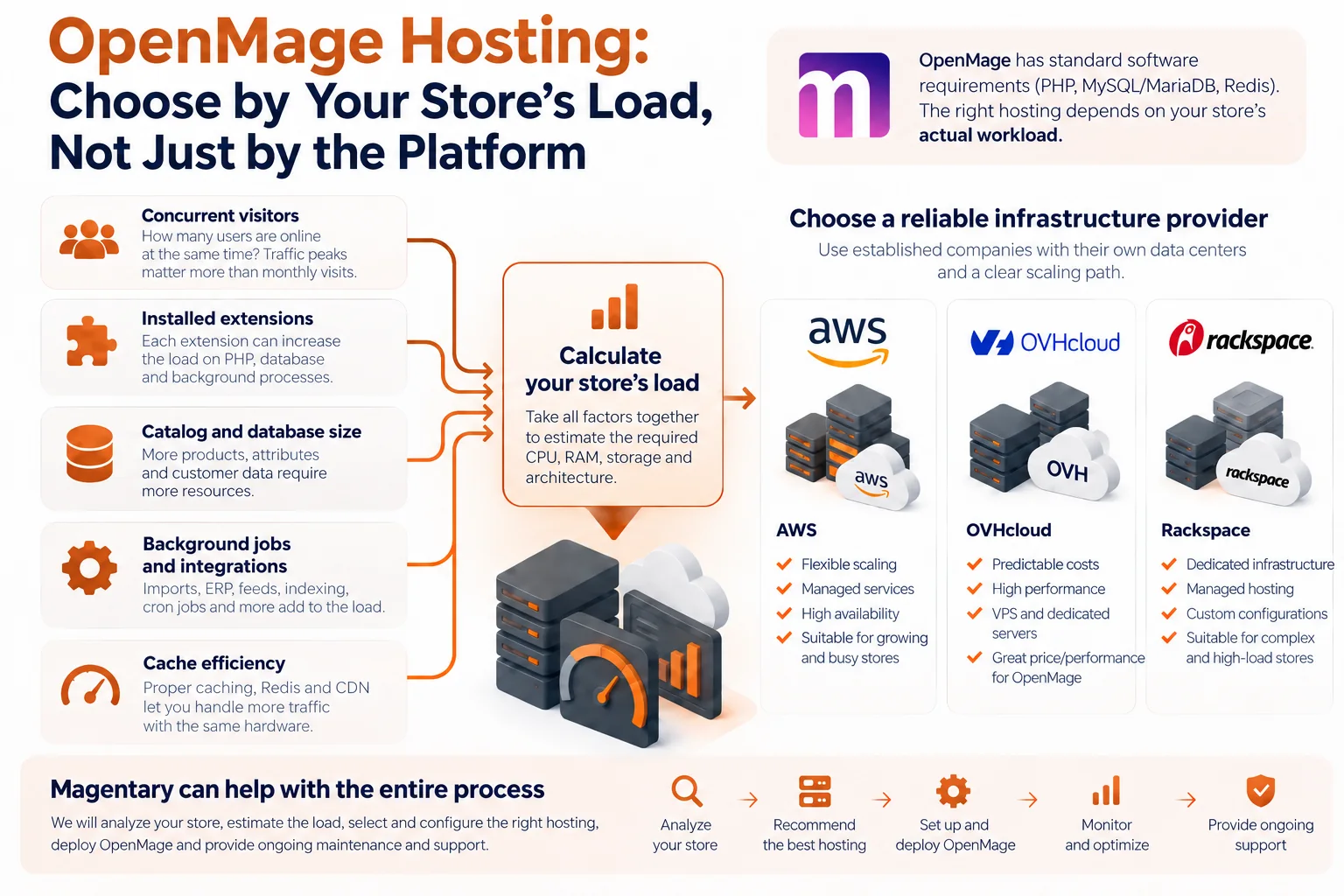
OpenMage itself has relatively straightforward software requirements. The current OpenMage requirements support modern PHP versions, MySQL or MariaDB, and optional Redis. What determines the server size is everything built on top of that foundation.
What Actually Determines OpenMage Hosting Requirements?
When sizing hosting for an OpenMage store, we normally look at several factors together.
Concurrent visitors
Monthly traffic alone tells very little about required server capacity.
A store receiving 100,000 visits evenly distributed across a month may require less infrastructure than a store receiving 20,000 visits during a two-hour promotion.
What matters is the number of simultaneous requests the application must process, especially requests that cannot be served from cache.
Product pages, search, login, cart operations and checkout all have different costs.
Installed extensions
Extensions can dramatically change the performance profile of an OpenMage installation.
A lightweight store with a standard catalog can run comfortably on modest hardware. Add several ERP integrations, custom pricing rules, layered navigation extensions, marketing integrations, additional observers and complicated checkout logic, and each PHP request may become substantially more expensive.
This is one reason why two stores with similar traffic may need completely different servers.
Catalog and database size
A store with 5,000 products behaves differently from one with 500,000 products, particularly when there are many attributes, configurable products, customer groups or pricing rules.
Large catalogs can increase:
- database memory requirements;
- index processing time;
- search workload;
- cron execution time;
- cache size;
- backup duration;
- administrative import/export load.
Database performance is often at least as important as raw web-server CPU performance.
Background jobs and integrations
Visitors are not the only source of load.
OpenMage stores commonly run:
- catalog imports;
- ERP synchronization;
- marketplace integrations;
- feed generation;
- inventory updates;
- email processing;
- reporting;
- backups;
- indexing;
- scheduled cron jobs.
A store that looks quiet from the frontend can still place considerable load on its server.
Cache efficiency
A properly configured store with effective page caching, Redis and a CDN can handle considerably more visitors using the same hardware.
The inverse is also true: throwing additional CPU at an inefficient extension or an uncached page is usually an expensive way to avoid fixing the actual bottleneck.
Do Not Choose Hosting by Visitor Count Alone
Statements such as:
“8 GB RAM is enough for 100,000 visitors per month”
should be treated with caution.
Visitor count is not a meaningful capacity metric without knowing the traffic pattern.
A better question is:
How many simultaneous users and dynamic requests must the store handle while maintaining an acceptable response time?
That number can be measured.
For an existing store, production metrics can show CPU consumption, PHP-FPM utilization, database load, disk latency and peak request rates.
For a new store, representative traffic can be generated with load testing before production launch.
This gives you something much more useful than a generic hosting recommendation: a measurable performance target.
What Should a Good OpenMage Server Provide?
For most OpenMage installations, we prioritize:
- modern, fast CPU cores;
- sufficient RAM for PHP workers, database caches and Redis;
- low-latency SSD or NVMe storage;
- predictable CPU performance;
- reliable backups;
- monitoring;
- good network connectivity;
- easy vertical or horizontal scaling.
For an all-in-one server, RAM needs particular attention because Linux, PHP-FPM, MySQL/MariaDB and Redis are all competing for the same memory.
Once a store grows, separating the application and database tiers often makes more sense than continuously increasing the size of a single machine.
Why We Prefer Established Infrastructure Providers
For production ecommerce, the cheapest VPS is rarely our first criterion.
We generally prefer established infrastructure providers with mature networks, data-center operations, hardware replacement procedures, monitoring facilities and multiple options for scaling.
Three providers worth considering are AWS, OVHcloud and Rackspace.
They approach infrastructure differently, so each can make sense for a different type of OpenMage deployment.
The configurations below are starting points, not universal OpenMage hardware requirements. The final choice should always be verified against the actual store.
OpenMage Hosting on AWS
AWS provides a very broad range of infrastructure services. Its EC2 general-purpose instances are specifically designed for balanced workloads such as web servers and small-to-medium databases.
For compatibility with existing integrations and monitoring software, x86 general-purpose instances are often a straightforward starting point. Current AWS generations include the M8i family.
Option 1: Small Store — Single EC2 Instance
A sensible starting configuration can be:
- EC2
m8i.large; - 2 vCPU;
- 8 GiB RAM;
- EBS SSD storage;
- Nginx;
- PHP-FPM;
- MySQL or MariaDB;
- Redis;
- external backups.
This configuration can work well for a relatively small store with modest simultaneous traffic and effective caching.
Everything runs on one machine, which keeps the architecture simple.
The disadvantage is equally clear: the web application, database and background processes compete for the same resources.
We would normally consider this an entry point rather than an architecture to scale indefinitely.
Option 2: Growing Store — EC2 Plus Separate Database
For a store with regular sales activity and more extensions, a better starting point might be:
m8i.xlargeclass application server;- 4 vCPU;
- 16 GiB RAM;
- EBS SSD storage;
- separate managed database using Amazon RDS;
- Redis or Amazon ElastiCache;
- CDN for static content.
Separating MySQL from the web server makes resource usage more predictable and allows the two components to be scaled independently.
This is often a good architecture for a medium-sized OpenMage store.
Option 3: Busy Store — Multiple Application Servers
For stores where downtime or performance degradation during traffic peaks would have a direct business impact, AWS makes horizontal scaling relatively straightforward.
A typical architecture could include:
- two or more EC2 application servers;
- load balancer;
- dedicated RDS database;
- Redis/ElastiCache;
- shared or object storage where appropriate;
- CDN;
- monitoring and automated backups.
The advantage here is not simply having a bigger server.
It is the ability to remove individual components as single points of failure and add application capacity when traffic grows.
OpenMage Hosting on OVHcloud
OVHcloud can be particularly attractive when you want predictable infrastructure costs and strong performance without assembling a large number of individual cloud services.
Its Public Cloud General Purpose instances are intended for balanced web and business workloads. Current b3 configurations range from small instances upward and use NVMe local storage.
OVHcloud also operates a broad dedicated-server portfolio when a store reaches the point where dedicated hardware becomes economical.
Option 1: Small Store — OVHcloud b3-8
The b3-8 currently provides:
- 2 vCores;
- 8 GB RAM;
- 50 GB NVMe storage.
It can be a practical starting point for a small OpenMage store where the application, database and Redis all live on the same VM.
As with the comparable AWS configuration, memory usage should be monitored carefully.
This option is best suited to stores with modest dynamic traffic rather than simply stores with a small number of products.
Option 2: Medium Store — OVHcloud b3-16 or b3-32
A growing store can move to:
b3-16
- 4 vCores;
- 16 GB RAM;
- 100 GB NVMe;
or, for a heavier workload:
b3-32
- 8 vCores;
- 32 GB RAM;
- 200 GB NVMe.
At this point there are two valid approaches.
The first is to keep the architecture simple and run the entire store on the larger instance.
The second is to split the database onto another instance, making database and application performance easier to tune independently.
Which option performs better depends on the actual workload.
Option 3: High Sustained Load — OVHcloud Dedicated Server
For predictable, sustained ecommerce workloads, a dedicated server can offer very good price/performance.
OVHcloud’s current Advance range is specifically positioned for hosting and other everyday business workloads, with dedicated AMD EPYC hardware, ECC memory and NVMe storage options.
A dedicated OpenMage setup could use:
- dedicated CPU cores;
- 32–64 GB or more RAM;
- mirrored enterprise NVMe drives;
- local MySQL/MariaDB for low latency;
or use two servers to separate the application and database.
Dedicated hardware is especially interesting when a store has consistent resource requirements and does not need cloud-style elasticity every hour.
OpenMage Hosting on Rackspace
Rackspace follows a somewhat different model.
Instead of concentrating on a public list of fixed VPS sizes, Rackspace Managed Hosting focuses on custom dedicated infrastructure, including compute, storage, networking, databases and private cloud environments.
That makes it more appropriate to discuss Rackspace in terms of architectures rather than individual VM SKUs.
Option 1: Single Managed Dedicated Server
For a smaller production environment, Rackspace can provide a dedicated server configured specifically for the application.
A practical target might be:
- 4–8 modern CPU cores;
- 16–32 GB RAM;
- enterprise SSD/NVMe storage;
- hardware or software RAID;
- managed networking;
- monitoring and backup.
Nginx, PHP-FPM, MySQL/MariaDB and Redis can all run on the same server.
The important distinction from a low-cost VPS is that the resources belong to a dedicated environment rather than being heavily shared with unrelated workloads.
Rackspace describes its managed hosting environment as single-tenant dedicated infrastructure with configurable compute, storage and networking.
Option 2: Dedicated Application and Database Servers
For a busier store, the architecture can be divided into at least two systems:
Application server
- Nginx;
- PHP-FPM;
- OpenMage;
- Redis or application cache.
Database server
- MySQL/MariaDB;
- RAM sized primarily around database working set;
- high-performance storage.
This layout provides much better workload isolation.
A large import or database operation is less likely to consume resources required by frontend PHP requests, while the database can be tuned independently from the web tier.
Option 3: Rackspace Private Cloud
For a larger OpenMage environment requiring redundancy, multiple application nodes or several related services, Rackspace OpenStack Private Cloud becomes another possibility.
Rackspace currently offers managed OpenStack private-cloud platforms as well as its OpenStack Flex architecture.
An OpenMage deployment could then include:
- multiple web/application instances;
- dedicated database nodes;
- Redis;
- load balancing;
- private networking;
- isolated staging environments;
- centralized backups and monitoring.
This is unlikely to be economical for a small shop, but it can make sense where OpenMage is part of a larger ecommerce infrastructure and dedicated private-cloud capacity is already justified.
AWS vs OVHcloud vs Rackspace for OpenMage
There is no universal winner.
| Provider | Particularly useful when |
|---|---|
| AWS | You need flexible scaling, managed infrastructure components or high availability across multiple services |
| OVHcloud | You want straightforward VMs or powerful dedicated servers with predictable infrastructure costs |
| Rackspace | You want dedicated infrastructure combined with a substantial managed-operations component |
The correct choice can also depend on geography, operational expertise, expected growth and whether your team wants to manage the operating system and database itself.
Start Small — But Leave a Scaling Path
There is nothing wrong with initially running OpenMage, PHP, Redis and MySQL on one server.
For many stores, that is actually the most efficient architecture.
The mistake is choosing a platform where the only solution to growth is an emergency migration.
A good initial hosting design should answer several questions in advance:
- Can CPU and RAM be increased without a complex migration?
- Can the database later move to a separate server?
- Can additional web nodes be introduced?
- Is private networking available between those systems?
- Can storage performance be increased?
- Are reliable snapshots and off-site backups available?
- Can infrastructure be monitored properly?
If those answers are clear, starting with a relatively modest server is perfectly reasonable.
Benchmark Before You Overprovision
Buying a 32-core server for a store that needs four cores is not performance engineering.
Neither is putting a production store on a small VPS and hoping the cache will compensate during Black Friday.
The better approach is to establish a target such as:
The store must support 150 simultaneous customer sessions with the expected product-view, search, cart and checkout mix while keeping application response time within the agreed threshold.
Then test it.
This also exposes problems that larger hardware alone may not fix — slow database queries, inefficient extensions, external API calls, PHP bottlenecks or poor cache behavior.
Once the bottleneck is known, infrastructure can be sized around evidence rather than guesswork.
Magentary Can Design and Manage Your OpenMage Hosting
Hosting selection does not have to be separate from the store itself.
Magentary can manage the infrastructure lifecycle together with your OpenMage installation, starting before the first production deployment.
We can help with:
- analysis of the existing store and extensions;
- traffic and capacity estimates;
- AWS, OVHcloud, Rackspace or other infrastructure selection;
- server and network architecture;
- Linux and web-server configuration;
- PHP and database tuning;
- Redis and caching;
- migration from an existing hosting provider;
- backups and disaster recovery;
- monitoring and alerting;
- security updates;
- performance troubleshooting;
- ongoing OpenMage and infrastructure maintenance.
Instead of selecting a generic OpenMage hosting plan, we can determine what the store actually needs today and design a path for what it may need tomorrow.