Technical resource
How to install SUPEE-6285 without SSH
Historical Magento 1 file-upload workflow for SUPEE-6285 when shell access was unavailable.
Note: This article describes a high-risk historical Magento 1 workaround. Do not upload an old prepared fileset to a current production store. Prefer a controlled upgrade to current OpenMage and validate the full security patch history.
SUPEE-6285 was released for Magento Community Edition in July 2015. The original article offered prepared patched files for stores without shell access. This conversion preserves the workflow and its constraints, but deliberately does not republish those version-specific archives as current downloads.
Why the no-shell method is different
The original patch was a shell script that changed a defined set of core files. Without shell access, an administrator had to apply it to a clean copy of the exact Magento release elsewhere, then upload the resulting files through SFTP or a hosting file manager.
That approach replaces complete files. It can overwrite local core edits and can combine incompatible code if the source release, prior patches or edition do not match. SUPEE-6285 also historically depended on earlier security work, including SUPEE-5994; the original prepared sets were not independent patches.
Preconditions
- Identify the exact Magento edition and version.
- Inventory prior patches and all core modifications.
- Create recoverable database and file backups.
- Prepare the patched files from a trusted patch source in an isolated copy of that exact release.
- Compare every replacement against the production file before upload.
- Rehearse deployment and rollback outside production.
Do not rely on the old downloadable ZIP names alone to establish compatibility.
Disable compilation
Disable Magento compilation before replacing application files and clear the compiled tree. The original admin location is illustrated below.
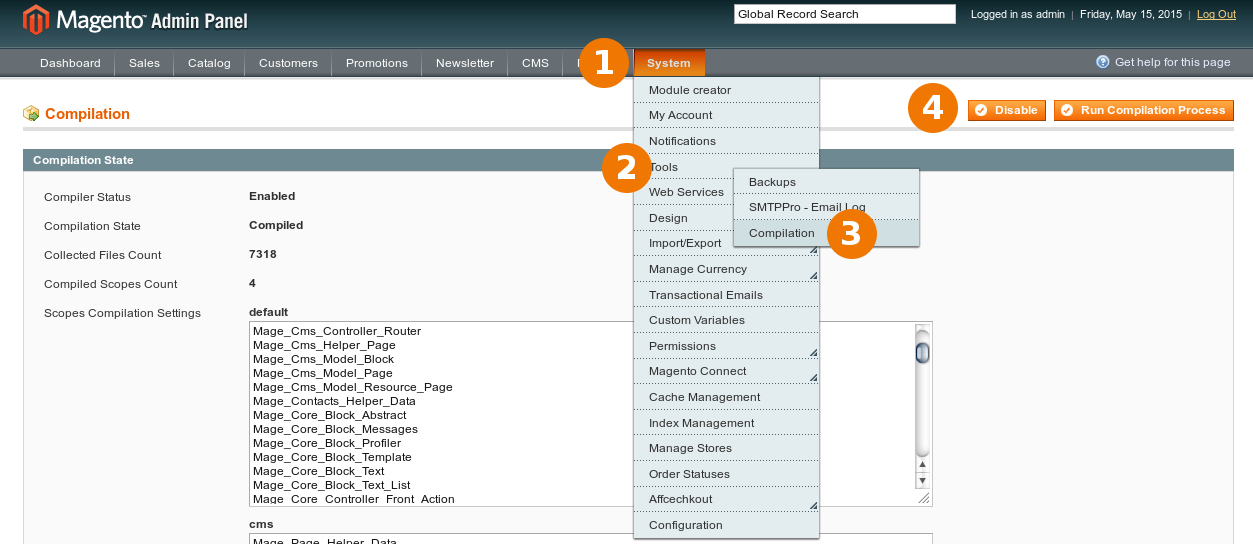
Where shell access exists in a preparation environment, the historical command sequence is:
$ php -f shell/compiler.php -- state
Compiler Status:          Enabled
Compilation State:        Compiled
$ php -f shell/compiler.php -- disable
Compiler include path disabled
$ php -f shell/compiler.php -- clear
Compilation successfully cleared
When the production host has no shell, the compiler state and compiled files must be handled through the admin and file-management facilities available on that host.
Prepare and compare the fileset
Apply the correct patch chain to a clean reference tree, then compare it with the deployed application. A local comparison makes unexpected customizations visible before any upload:
$ diff -ruN clean-magento/ patched-magento/
$ diff -ruN production-copy/ patched-magento/
Resolve differences deliberately. Never replace a customized core file without porting and reviewing the customization, and never upload files prepared for a different Magento version.
Upload and verify
Use a maintenance window and upload only the reviewed changed paths, preserving their directory structure and permissions. Then clear Magento caches and the PHP opcode cache using the controls available from the hosting platform.
Verify at minimum:
- storefront and admin authentication;
- customer account and password flows;
- cart, checkout and the configured payment methods;
- API and integration endpoints;
- cron and queues used by the store;
- application, PHP and web-server logs.
If any check fails, restore the known-good files and database state before attempting ad-hoc repairs in production.
Comments
Archived discussion
Yes please - I second that!
Apart from that - thank you again for supplying the patch(ed) files!
Regards from Switzerland
Hi, Can someone help with the following
/var/www$ sh ./PATCH_SUPEE-6285_CE_1.8.1.0…
./PATCH_SUPEE-6285_CE_1.8.1.0…: 14: ./PATCH_SUPEE-6285_CE_1.8.1.0…: 127: not found
./PATCH_SUPEE-6285_CE_1.8.1.0…: 14: ./PATCH_SUPEE-6285_CE_1.8.1.0…: 127: not found
./PATCH_SUPEE-6285_CE_1.8.1.0…: 25: ./PATCH_SUPEE-6285_CE_1.8.1.0…: 0: not found
Checking if patch can be applied/reverted successfully…
-e ERROR: Patch can’t be applied/reverted successfully.
I also had two files fail
patching file app/design/frontend/base/default/template/checkout/cart.phtml
Hunk #1 FAILED at 98.
1 out of 1 hunk FAILED – saving rejects to file app/design/frontend/base/default/template/checkout/cart.phtml.rej
atching file downloader/Maged/Controller.php
Hunk #4 succeeded at 451 (offset -5 lines).
Hunk #5 FAILED at 1120.
1 out of 5 hunks FAILED – saving rejects to file downloader/Maged/Controller.php.rej
I have manually installed the 2 files and now get
patching file app/design/frontend/base/default/template/checkout/cart.phtml
Reversed (or previously applied) patch detected! Assume -R? [n]
Apply anyway? [n]
Skipping patch.
1 out of 1 hunk ignored – saving rejects to file app/design/frontend/base/default/template/checkout/cart.phtml.rej
Skipping patch.
1 out of 1 hunk ignored – saving rejects to file app/design/frontend/base/default/template/checkout/cart.phtml.rej
patching file downloader/Maged/Controller.php
Reversed (or previously applied) patch detected! Assume -R? [n]
Apply anyway? [n]
Skipping patch.
5 out of 5 hunks ignored – saving rejects to file downloader/Maged/Controller.php.rej
Hi guys, great work!
Can you guys post the patch for version 1.9.0.1? (Or would 1.9.1.0 - 1.9.1.1 fall under this?)
Thanks
I installed the patch 6285 two days ago and got the email from magento today to revert the patch and install v2. problem is i don’t have shh access to i used the zip file. Do i really need to revert the previous version of can i simply download the file and upload the following directory
app/design/frontend/rwd/default/template/checkout/cart.phtml Thanks a mill!!
Hi there, i added the files and now can’t get into my admin page. I get this message instead
Front controller reached 100 router match iterations
and get 4 lines of errors underneath. Please help if you can. I applied the previous patches with no problem.
Hello,
Thank you for all the PATCHES in the first place!
Magento ver. 1.8.1.0
I installed all the PATCHES about 3 weeks ago, and now in the admin backend the CMS > STATIC BLOCKS and PAGES looks something like this only when I access a page or a static block to modify: http://screencast.com/t/Vur… Any idea of what cause this? Maybe the modifications below?
app/code/core/Mage/Adminhtml/controllers/Cms/Block/WidgetController.php
app/code/core/Mage/Adminhtml/controllers/Cms/Page/WidgetController.php
app/code/core/Mage/Adminhtml/controllers/Cms/PageController.php
app/code/core/Mage/Adminhtml/controllers/Cms/WysiwygController.php
Thanks in advance!
Thank you for fast reply!
Compiler is DISABLE chace Cleared many times.
Only error I got is this
[02-Oct-2015 06:17:02 UTC] PHP Fatal error: Class ‘Varien_Data_Collection_Filesystem’ not found in /public_html/app/code/core/Mage/Widget/Model/Widget/Config.php on line 85
and on line 85 its says something like:
return $result; }
Another error in the system.log is:
2015-10-02T06:17:02+00:00 ERR (3): Warning: include(Varien/Data/Collection/Filesystem.php): failed to open stream: No such file or directory in public_html/lib/Varien/Autoload.php on line 93 2015-10-02T06:17:02+00:00 ERR (3): Warning: include(): Failed opening ‘Varien/Data/Collection/Filesystem.php’ for inclusion (include_path=‘public_html/app/code/local:public_html/app/code/community:public_html/app/code/core:/public_html/lib:.:/usr/lib/php:/usr/local/lib/php’) in /public_html/lib/Varien/Autoload.php on line 93
Thank you man for open my eyes :). I am not a coder and don’t know much about coding.
I checked that path and yes, that filesystem.php was not there, but it was filesystem.php.suspected . I don’t know how that file end up there. I uploaded a clean Filesystem.php and now everything is fine, I can see all the data on on CMS> Pages and Static Blocks content. Now, I don’t know if I have to delete that filesystem.php.suspected , what do you recommend?
Thanks again for the infos you provide us!
Those who are asking for this patch for magento v1.8.0.0, Take the patch for magento v1.8.1.0 and do not include these files:
Thanks for your great work. Can I install patch 1.7.0.2 on 1.7.0.0 ? Also Can I install patch 1.7.0.2 on 1.7.0.1 ?
Also we can not upgrade our Magento higher version, due to the high risk. Pls help us out here, thanks for your support.