Technical resource
How to get a list of installed Magento patches
A legacy HTML article rendered inside the native Magentary header, footer and technical-article layout.
Note: This page is a trial of the fast legacy-body migration path. Its original article HTML is retained inside the native site shell; the Magento 1 instructions are historical.
Due to changes in Magento release policies, updates were frequently released as patches. It became important to keep track of which patches were installed and which core files were modified.
Successfully installed patches are logged in app/etc/applied.patches.list. Open this file in a text editor to review installed patches and changed files:
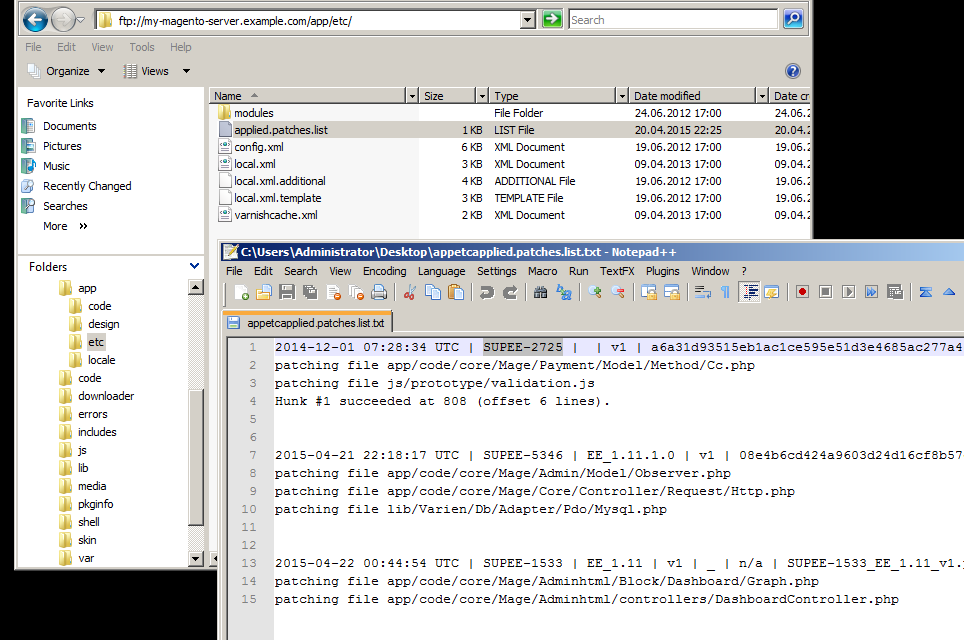
To get only the installed patch names:
$ grep -F '|' app/etc/applied.patches.list | cut -f 2 -d'|'
 SUPEE-2725
 SUPEE-5346
 SUPEE-1533
To get patch names with their installation dates:
$ grep -F '|' app/etc/applied.patches.list | cut -f 2,1 -d'|'
2014-12-01 07:28:34 UTC | SUPEE-2725
2015-04-21 22:18:17 UTC | SUPEE-5346
2015-04-22 00:44:54 UTC | SUPEE-1533
Comments
Archived discussion